
|
PixInsight |
Repository Management |
updated: 2026-02-19 |
|
Purpose |
The Repository in PixInsight is used to manage updates and new scripts or processes |
|
Activation |
Menu: Resources 🡺 Updates 🡺 Manage Repositories |
|
Resources |
PixInsight Reference Documentation — PixInsight Update Repositories |
|
Prerequisites |
PixInsight 1.8.9 or higher |
For example, the RC-Astro AI functions, such as the BluxXTerminator, can be installed using this approach.
- In PixInsight, go to Resources > Updates > Manage Repositories
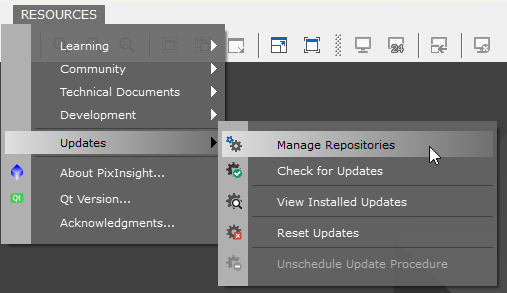
- a new windows opens up:
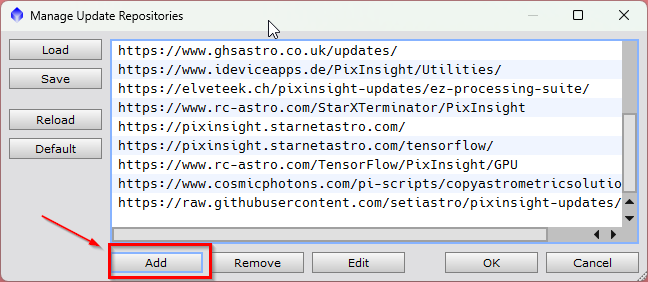
- Click Add
- Add a valid repository URL address (like https://www.rc-astro.com/BlurXTerminator/PixInsight for BlurXTerminator)
- Click OK and OK again
- Go to Resources > Updates > Check for Updates. There should be at least 1 new entry in the list which needs installation.
- Click Apply to start the download
- Quit PixInsight. When prompted to install updates, click Yes.
- Depending on the nature of the new feature, you can find it under Script or Process when PixInsight restarts.
Resources: PixInsight Reference Documentation — PixInsight Update Repositories
Created with the Personal Edition of HelpNDoc: Free EPub producer