
|
PixInsight |
Step 5: MLDeNoise (MLDN)from PixInsight |
updated: 2026-10-06 |
|
Purpose |
New AI based tool to denoise images. |
|
Activation |
Process 🡺 Noise Reduction 🡺 MLDenoise |
|
Input |
Deconvoluted and cropped image from previous step 4 |
|
Output |
De-noised image with post-fix “*_MLDN” into folder "Work" |
|
Previous Step |
|
|
Next Step |
|
|
Resource(s) |
MLDenoise_v42.xmlm (under: downloads\astro\PostProcessing\PixInsight\MLDenoise) |
|
Download |
MLDenoise machine learning model from https://pixinsight.com/dist/ |
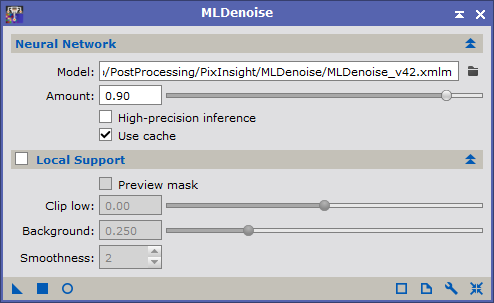
New since: PixInsight Core 1.9.5 Lockhart (x64) (build 1702 | 2026-09-17)
Model
Full path to the neural-network model file used for de-noising. (see download path on top of this page).
Amount
Strength of the denoising effect. Each output pixel is a linear blend between the original and the denoised result:

1.00 applies to full denoise; 0.00 leaves the image unchanged; intermediate values keep part of the original noise. The default value is 0.90.
High-Precision inference
MLDenoise has a new High-precision inference option. By default, GPU inference runs in reduced precision, which is faster: on NVIDIA hardware the CUDA execution provider rounds the float32 inputs of convolutions and matrix products to ten mantissa bits (TensorFloat-32), and on Apple hardware Core ML accumulates in low precision on the GPU. With the option enabled, inference runs in the full precision of the model's float32 weights and matches CPU inference closely: on a linear luminance master, the maximum deviation from CPU inference is 1.8e-6 in high precision, against 1.6e-5 in the default mode. The cost is moderate: a 26-megapixel image takes 39.9 seconds in high precision and 31.9 seconds in the default mode on an NVIDIA RTX A4000. The option has no effect on CPU inference, which always runs in full precision.
Use Cache
When this option is enabled, MLDenoise generates internal cache structures to store intermediate process results. When the process is executed in the same view, and there are no changes to critical parameters that would invalidate existing cached data, the cache is used to accelerate execution by reusing previously calculated images and auxiliary objects. This option is enabled by default. You can turn it off to save memory or for verification purposes.
Local Support
The built-in local support feature provides full control over how the noise reduction process is applied as a function of brightness through an inverted mask. Dark mask pixels protect high-signal image regions, and bright mask pixels allow more noise reduction in low-signal background areas.
Our noise reduction neural networks have been trained on immense datasets covering a wide variety of noise and structure distributions and morphologies in deep-sky astronomical images. This extensive training enables the system to differentiate noise from significant structures in virtually any image where this process can be applied,
making local supports and masks unnecessary in most cases. However, noise reduction can be a highly delicate and subjective task that requires high versatility. This local support feature lets you control the amount of applied noise reduction differently for each pixel in the target image as a function of illumination. This helps adapt the process to the user's preferences and taste in such a critical task as noise reduction.
Preview Mask
Preview the noise reduction mask. This is a special control mode that you should use to evaluate how the mask
will protect the high-signal regions of the image. Black mask pixels will block noise reduction completely, while white mask pixels will allow full noise reduction at the currently selected amount. Gray mask values define intermediate protection levels.
Clip Low
Low clipping point parameter for mask generation, expressed in sigma units.
This value is expressed as a distance in robust sigma units from the image's median. Negative values locate the mask clipping point to the left of the main histogram peak. Positive values tend to clip the bulk of the background pixels, which is more aggressive at reducing noise in sky background regions.
Background
Normalized mean background level.
The noise reduction mask will be delinearized to achieve the specified mean background level in the [0,1] range.
Higher values increase protection in the highlights. Lower values allow more noise reduction over bright image structures. The default value is 0.25.
Smoothness
This is the radius in pixels of a morphological median filter that will be applied to smooth the noise reduction mask. A smoothed mask is more robust to small-scale local variations, which makes it more efficient for noise reduction. However, too large of a smoothness value will lead to an inaccurate mask that won't protect significant structures
appropriately. Good values are often in the range from 1 to 4, depending on the dominant scale of the noise in the image. To disable smoothing of the mask, set this parameter to zero.
Created with the Personal Edition of HelpNDoc: Streamline Your Documentation Process with HelpNDoc's Project Analyzer